Plentake turns your transcript into clean, correctly-timed subtitles with one click — free, in whichever language you're editing in. Want the look of a Short or Reel? Pick one of 13 animated styles and it lands on your timeline as a transparent overlay, rendered right on your computer.
Most caption tools want you to export a file, drag it into a separate app, then re-import whatever comes back — and if you cut the video afterward, the timing drifts and you start over. Captioning should happen where the editing already happens.
Plentake's Captions tab reads the transcript you already have (or makes one on the spot) and builds subtitles straight on your timeline — correctly timed to your current cuts, in whichever language you recorded in. It's free: plain subtitle generation doesn't use credits. Turn on AI polish for 5 credits and the wording gets regrouped by meaning — fewer awkward mid-sentence breaks, lines that read the way a person would actually say them.
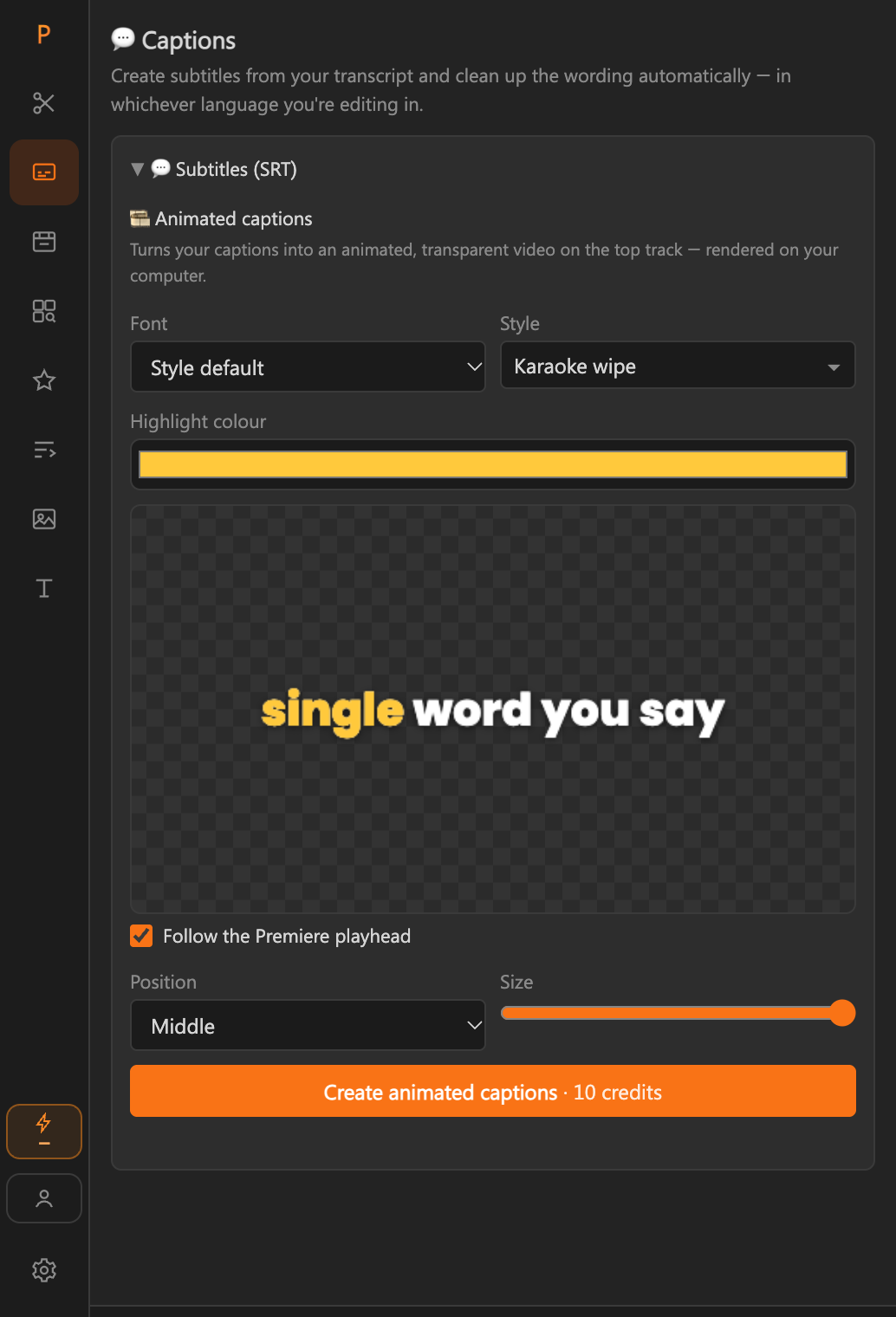
When you want more than plain subtitles, the same tab makes animated captions: karaoke wipes, sliding pills, one-word bounces and more, drawn as a transparent video on a new track above your footage — no After Effects, no motion-graphics templates to hunt for.
Every style, playing live. Pick one in the panel and it's drawn on your computer as a transparent overlay on a new track above your footage.
✦ Styles marked with a star let the AI pick which words to emphasise (and add emoji). Every style has Advanced settings — colours, outline, shadow, words per caption, entrance motion and speed.
Three steps, all inside Premiere Pro — no exporting, no separate app.
Transcribe the open sequence right from the Captions tab, or reuse a transcript you already made in another tool — Plentake shares one transcript across the whole panel.
Choose how many words and characters a caption line can hold, and switch on AI polish if you want lines regrouped by meaning instead of raw word count.
Plentake builds the captions and times them to your current sequence, so if you've already trimmed dead air or filler words, the subtitles follow the edit, not the original recording.
Open the style list and hover any style: a small preview plays next to your cursor, so you see the motion before you commit.
Price: 10 credits per minute of captions (rounded up). Plain subtitles stay free.
Standalone caption generators don't know your sequence changed. Plentake lives inside Premiere, so captions are built from the transcript you're already using and timed to the cuts you've already made — not a separate file you have to keep back in sync.
Captions default to sensible settings, but every part of the line style is yours to adjust:
From a raw sequence to timed, on-timeline subtitles.
In Premiere Pro: Window → Extensions → Plentake. Sign in — a free account unlocks the A-Roll Cleaner and gives you credits to try the paid tools.
It sits right between A-Roll Cleaner and B-Roll Editor in the sidebar.
If this sequence hasn't been transcribed yet, the tab's own "Transcribe this sequence" button handles it — free, in ~99 languages. If you already transcribed it elsewhere in the panel, Plentake reuses that transcript automatically.
Defaults work for most platforms, but adjust them if you're targeting a specific caption style or strict width limit.
List the names and jargon from your video so they're spelled your way. AI polish (5 credits) regroups caption lines by meaning instead of a strict word count, so breaks fall where a person would naturally pause.
Plentake builds the captions and times them to your sequence as it stands right now, cuts included. Need to fix a word? Open List view, search and replace, and apply.
In the Animated captions section, open the style list and hover to preview. Pick a font, a position, a size and your colours — the live preview follows your playhead.
Confirm the cost (10 credits per minute, +5 for ✦ styles). Plentake renders on your computer with a progress screen, then places the transparent captions on a new top track. Switch off the eye on the plain caption track if you only want the animated version.
Start free with the A-Roll Cleaner and Captions, then try the AI tools with trial credits — no credit card to begin.
Get started — freeYes. Plain subtitle generation from your transcript doesn't use credits, on the free plan or any paid plan. Optional extras cost credits: AI polish is 5 credits, and animated captions are 10 credits per minute of captions.
A transparent caption video that Plentake renders on your computer and places on a new track above your footage. There are 13 styles — for example karaoke wipe, sliding pill, boxed karaoke, colour glide, typewriter and one-word bounce — with a choice of 15 fonts, position, size and highlight colours.
10 credits per minute of captions (rounded up to the next minute). Styles marked with a sparkle also use AI to pick which words to emphasise and add emoji, which adds 5 credits. Plain subtitles stay free.
No. Animated captions are drawn and rendered on your own computer. For the AI styles, only the caption text — not your video or audio — is sent to pick the emphasised words.
Yes. Animated captions follow your sequence size — 16:9, square or 9:16. In vertical sequences captions sit above the area that Shorts and Reels interfaces cover, and the panel's preview shows just the caption band so it stays compact.
Build captions after you've made your cuts for the best match — Plentake times each caption to the sequence as it stands at that moment. If you cut again afterward, regenerate the captions so the timing follows the new edit.
Yes. List view shows every caption line with find-and-replace, so you can fix a name everywhere at once. Premiere can't edit an existing caption track in place, so Plentake adds a new track with your changes — switch off the eye on the old track.
No — it only changes where lines break (and, with key terms set, fixes names it misheard). Instead of cutting strictly at a word or character count, it regroups the same words by meaning, so a line doesn't end mid-thought.
Whichever language you recorded in. Captions follow your transcript's language automatically — Standard transcription (free, 30 minutes a month) covers around 99 languages, and Premium transcription (2 credits per minute) is tuned for 18 languages for the highest accuracy.
Yes. On Windows the panel renders the transparent captions as an image sequence that Premiere imports as a clip. We test macOS most thoroughly, so tell us at hello@plentake.com if anything looks off.
No. The Captions tab has its own "Transcribe this sequence" button, so you can go straight from a raw sequence to subtitles without visiting another tab. If you've already transcribed it elsewhere in the panel, Plentake reuses that transcript instead of making a new one.
Plain subtitles are standard Premiere captions you can restyle with Premiere's own text tools. For karaoke highlights, bold pop-ins and other motion, use the animated captions above — they're a separate transparent overlay with their own styles.